 |
IPSDK 4.2
IPSDK : Image Processing Software Development Kit
|
|
IPSDK 4.2
IPSDK : Image Processing Software Development Kit
|
| image = | connectedComponent2dImg (inBinLabImg) |
| image = | connectedComponent2dImg (inBinLabImg,inOptNeighborhood2d) |
| scalar = | connectedComponent2dImg (inBinLabImg,inOptNeighborhood2d,outLabelImg) |
Connected component image 2d labeling algorithm.
Connected component labeling algorithm allows to uniquely labeled subsets of connected components with respect to a given neighborhood policy.
Output labels start with 1 and are consecutive with respect to scanning order (from lower x then y to higher).
For more informations on used neighborhood 2d types report to 2d neighborhood models.
Resulting image buffer type must be one of the following :
Here is an example of connected component extraction operation applied to a binary input image (with 8 connexity neighborhood type) :
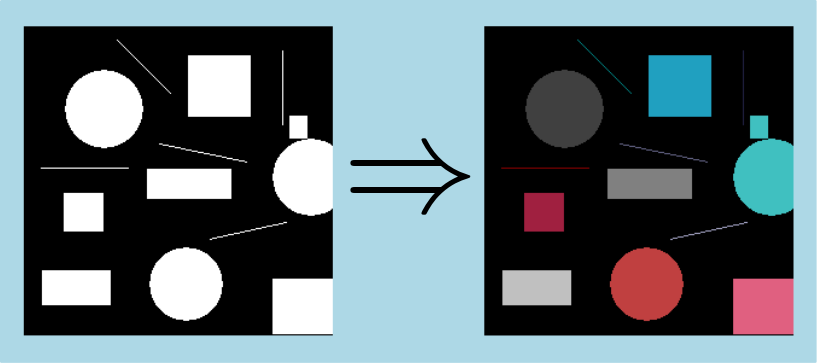
Here is an example of connected component extraction operation applied to a binary input image (with 4 connexity neighborhood type) :
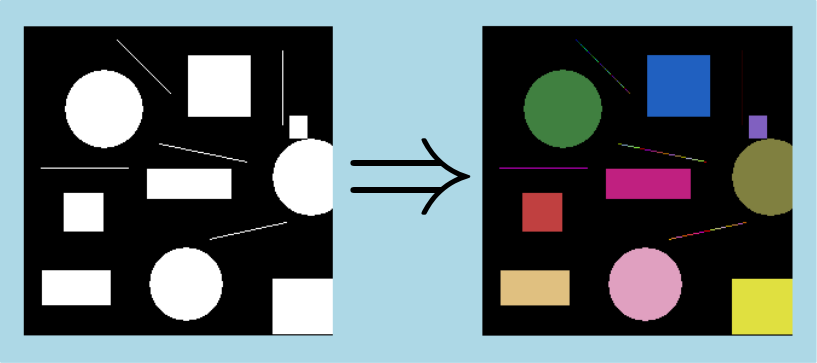
The algorithm also allows to relabel a label image. This way all connected component will be assigned to a unique label.
Here is an example of relabel of a label image using the connected component algorithm in 2d case :
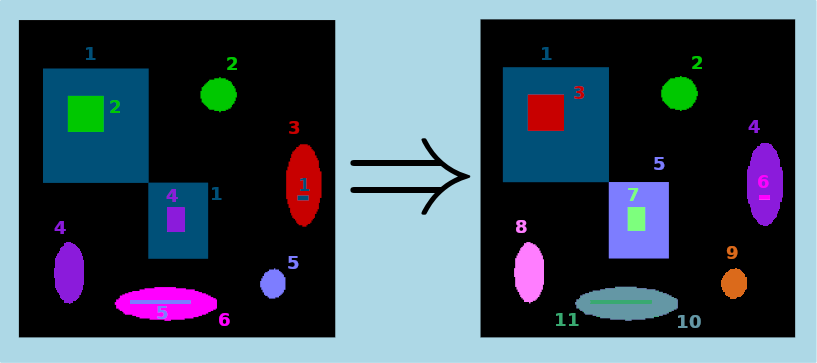
 IPSDK by Reactiv'IP